Which GPU do you need for ComfyUI video in 2026? 24 GB explained
Why ComfyUI video wants a 24 GB NVIDIA card, how the RTX 3090, 4090 and 5090 compare, and when renting on Vast.ai beats buying, bandwidth costs included.
Short answer: an NVIDIA card with 24 GB of VRAM. A used or older RTX 3090 is the value pick, a 4090 is faster, and a 5090 is lovely but more than most people need. If you don’t own any of those, rent one by the hour and don’t feel bad about it.
That’s the whole answer for most readers. The rest of this post is the reasoning, so you can decide whether to spend money or not.
Why 24 GB and not 16?
Because the models don’t fit comfortably in less. When the AI Character Kit was tested on an RTX 3090 Ti with fp8 models, peak memory use was:
- About 17.4 GB for images (Krea 2)
- About 16.5 GB for video (Wan 2.2 image to video)
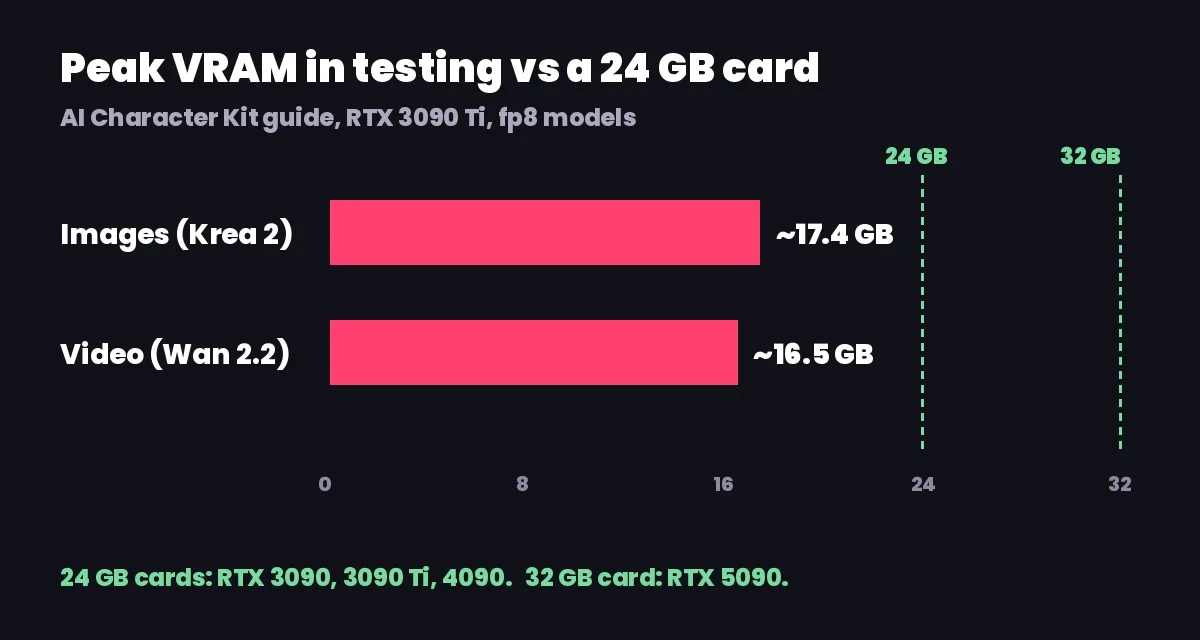
Both are over 16 GB. A 16 GB card might still limp through with ComfyUI moving parts of the model into system RAM, but the kit isn’t tested that way, and I wouldn’t buy a 16 GB card specifically for this. The headroom on a 24 GB card is also what lets you keep a browser and a video player open without the render falling over.
System RAM matters more than people expect. Video models shuffle data between RAM and VRAM, so the guide asks for 32 GB of system RAM or more. With 16 GB, images can work, but video will be slow or crash.
Mac and AMD cards aren’t supported by the kit.
How do the 3090, 4090 and 5090 compare?
All the kit’s timings come from a 3090 Ti, after models were loaded once:
| Job | Time on RTX 3090 Ti |
|---|---|
| Character image (Krea 2) | about 32 s |
| New scene edit (Qwen Image Edit 2511) | about 15 s |
| 5 second video (Wan 2.2) | about 2 min |
| Character swap (Wan Animate 2) | about 3 min |
From there, the guide’s rough comparison:
| Card | VRAM | Speed vs 3090 | My take |
|---|---|---|---|
| RTX 3090 / 3090 Ti | 24 GB | baseline | Best value. Everything runs. |
| RTX 4090 | 24 GB | about 1.5 to 2 times faster | Worth it if you render all day. |
| RTX 5090 | 32 GB | fastest | Often overkill for this. |
Here’s the honest bit: speed matters less than you think for this kind of work. A 2 minute clip versus a 1 minute clip doesn’t change your week. Running out of memory does. That’s why the 3090 keeps winning on value. It has the same 24 GB as a 4090, and it’s slower in a way you’ll barely feel.
The 5090’s extra memory is nice for higher resolutions or longer clips in one go, but the kit’s default settings sit well inside 24 GB.
Should you rent or buy?
Do the maths with your own numbers. Rented 3090s and 4090s on Vast.ai run about $0.25 to $0.40 an hour (October 2026 prices; they move constantly). So:
- At $0.30 an hour, every $100 of card price buys about 333 hours of rented GPU time.
- Divide the price of a card in your market by your hourly rental price. That’s your break-even in hours.
Then add what the simple sum leaves out:
- Electricity on your side if you buy.
- Resale value. A 3090 you sell in two years gets some money back.
- Your other uses. If you also game or train models, buying gets more attractive.
- Your time. Renting means waiting for setup on every new instance.
My rule of thumb: if you’re making a few videos a week, rent. If the GPU would be busy most evenings, or you already have a desktop that can take a 3090 (power supply and case space included), buy one.

What does renting really cost?
The hourly price is only part of it. Vast.ai’s pricing docs list three components: GPU compute billed per second while running, storage billed for as long as the instance exists (even stopped), and bandwidth charged per byte for upload and download, at a rate each host sets.
Bandwidth is the one that bites with ComfyUI. The kit’s four workflows pull about 93 GB of models onto every fresh instance. On a host charging $0.03 per GB, that’s close to $3 before you render a single frame. That’s around ten hours of GPU time on a cheap 3090.
So when renting:
- Filter by download price first. Pick a host with free or very cheap traffic.
- Choose on-demand, not interruptible. Interruptible is cheaper, but it can pause mid-render.
- Rent at least 120 GB of disk for all four workflows.
- Stop between sessions if you’re coming back within a day or two, so you don’t download 93 GB again.
- Destroy when done for good, after downloading your outputs.
The full walkthrough, host filters and a cost table are in running ComfyUI on Vast.ai cheaply.
How much disk do you need at home?
About 100 GB free if you install all four workflows. You don’t have to do it all at once:
| Step | Workflows | Download |
|---|---|---|
| Start | 01 and 02 (images) | about 35 GB |
| Add video | 03 | about 33 GB more |
| Add swaps | 04 | about 22 GB more |
Put it on an SSD if you can. Models load from disk on the first run of each workflow, and that first run is always slower.
What if you still run out of memory?
It happens, especially if you jump between image and video workflows. The fixes that work:
- Close other GPU apps. Browsers with hardware acceleration and games count.
- Restart ComfyUI between big workflows to clear VRAM.
- Lower Wan 2.2 to 49 frames (3 seconds) instead of 81.
- Keep the default 480 x 832 size for video and upscale the finished clip, rather than rendering big. The settings that fit are in Wan 2.2 image to video settings for 24 GB.
If none of that helps on a 24 GB card, something else is eating memory, or a model isn’t the fp8 version the workflow expects.
So what should you actually do?
If you already own a 3090, 3090 Ti, 4090 or 5090, you’re done. Install ComfyUI and go.
If you don’t, rent a 3090 for an evening before spending anything. You’ll find out if you enjoy this enough to buy hardware, and it’ll cost about a dollar if you pick a free-bandwidth host.
The AI Character Kit was built and tested on a 24 GB card and includes a Vast.ai setup script, so the rented route takes one paste instead of an afternoon.